Create Your Own
NFC Business Card
You do not need to buy an expensive pre-programmed digital business card. With Meetili, you can write your own digital card to a compatible blank NFC tag in a few minutes.
Free to create • Use your own NFC tag • No pre-programmed card needed
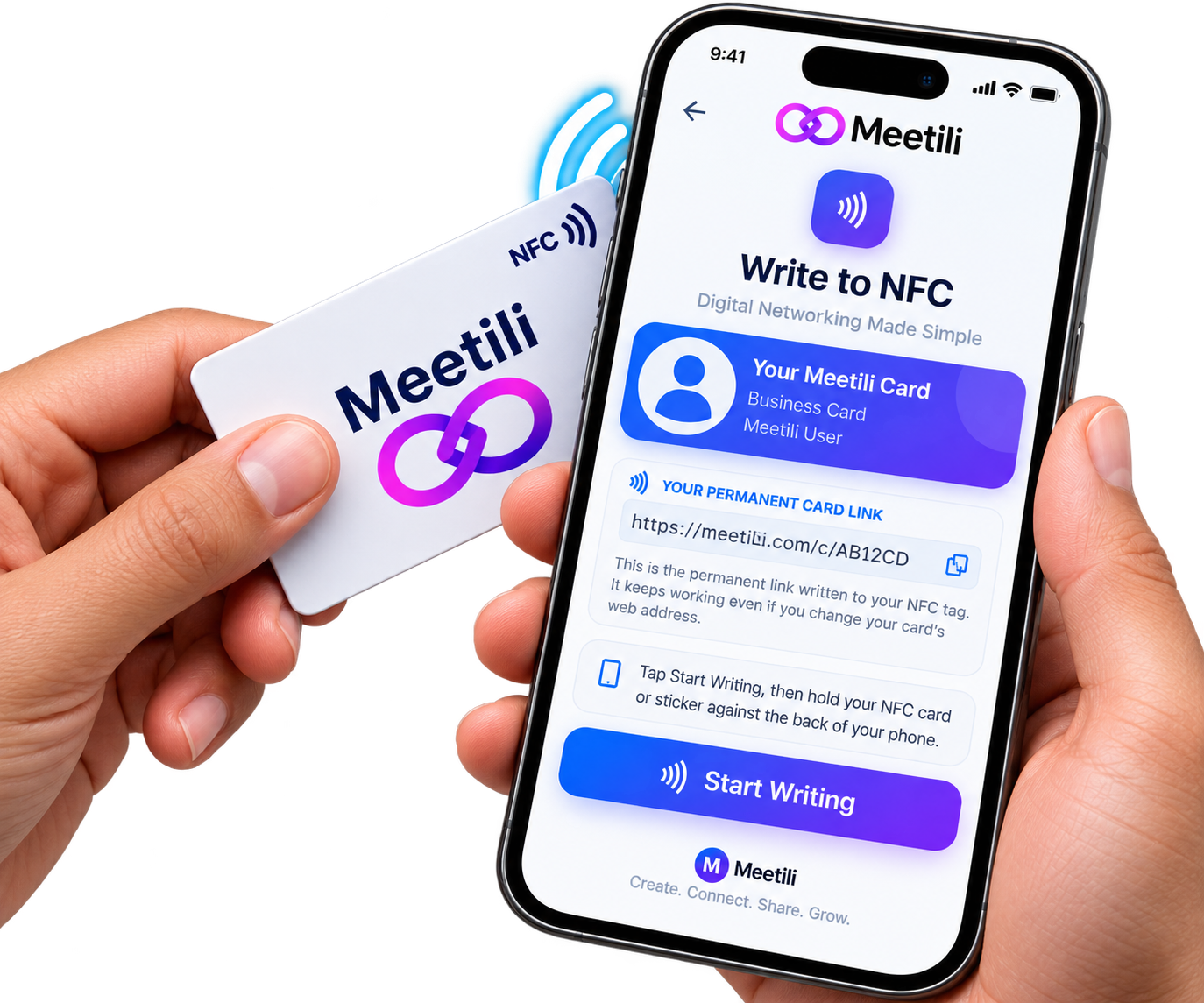
Write Your Own NFC Tag
Many companies sell pre-programmed NFC business cards at a premium. With Meetili, you can do it yourself. You create a free digital card, then write it to a compatible blank NFC tag using Meetili\u2019s built-in NFC writer.
This means you can use any compatible NFC tag — a card, a sticker, a key fob or any other NFC form factor — and write your Meetili card link to it. You are not tied to a specific supplier or a proprietary card.
How to Create Your Own NFC Business Card
Seven steps from sign-up to tap-to-share.
Create a Meetili digital Business Card
Sign up for a free Meetili account and add your contact details, photo, social links and any other information you want to share. Your card is ready in a few minutes.
Obtain a compatible writable NFC card or tag
Purchase a blank writable NFC card or tag. Common types include NTAG213, NTAG215 and NTAG216. These are widely available from online retailers and are inexpensive.
Open Meetili’s NFC-writing feature
On a compatible device, open your Meetili card and use the built-in NFC writer. The writer guides you through the process step by step.
Write the permanent card link to the NFC tag
Meetili writes a permanent URL to the tag — not your mutable web address. This means the tag keeps working even if you later change your custom web address.
Tap the NFC tag against a compatible phone
Hold the written NFC tag near someone’s NFC-enabled phone. Their phone detects the tag and opens your Meetili card in a browser.
Your Meetili digital card opens
The other person sees your contact details, social links and any other information you have chosen to share. They can save your details to their phone with one tap.
Update your digital card anytime
When you change your phone number, email, photo or any other details, update them in Meetili. The NFC tag automatically opens your updated card — no need to rewrite the tag or buy a new one.
What You Need
Three things to get started with your own NFC business card.
A Meetili account
Sign up free at meetili.com. No credit card required to create your digital card.
A compatible NFC tag
A blank writable NFC card or tag (NTAG213, NTAG215, NTAG216 or similar). Widely available and inexpensive.
An Android phone with NFC
NFC writing requires an Android device with NFC enabled and a compatible browser such as Chrome. The Meetili Android app also supports NFC writing.
Device and Browser Requirements
NFC writing has specific device requirements. It is important to understand these before you start, so you know whether your device can write an NFC tag.
Supported
- Android phone with NFC hardware enabled
- Chrome browser on Android (Web NFC)
- Meetili Android app (native NFC bridge)
Not Supported for Writing
- iPhone and iPad — Apple does not expose Web NFC to the browser
- Desktop computers — no NFC hardware
- Android phones with NFC disabled in settings
If you are using the Meetili Android app and NFC writing is not available, you can hand off to the Chrome browser to complete the write. iPhone users can still create and share a Meetili card using a QR code or personal link — only NFC writing is unavailable on iOS.
Why Write Your Own NFC Tag?
Writing your own NFC tag gives you flexibility and control that pre-programmed cards do not.
Use any compatible tag
You are not tied to a proprietary card. Use a card, sticker, key fob or any other NFC form factor that suits you.
No expensive pre-programmed card
Standard NTAG tags are inexpensive and widely available. You do not pay a premium for a pre-written card.
Permanent link, not mutable
Meetili writes a permanent URL to the tag. If you change your custom web address later, the tag keeps working.
Update without rewriting
The tag stores a link to your digital card, not your contact details. Update your card in Meetili and the tag reflects the changes automatically.
Frequently Asked Questions
Common questions about creating your own NFC business card with Meetili.
Can I write my own NFC business card?
What kind of NFC tag do I need?
Can I create an NFC business card on iPhone?
Do I need to buy a special NFC card?
Can I update my card after writing it to NFC?
How much does it cost to create an NFC business card with Meetili?
What if my phone cannot write NFC tags?
Ready to Write Your Own NFC Tag?
Create your free Meetili digital card, then write it to any compatible NFC tag. No pre-programmed card needed.
Free to create • Use your own NFC tag • Update anytime