NFC Digital
Business Card
Share your contact details with a tap. Write your Meetili digital card to a compatible NFC tag, and anyone who taps it against their phone sees your card instantly.
Free to create • No credit card required • Start sharing today
What Is an NFC Digital Business Card?
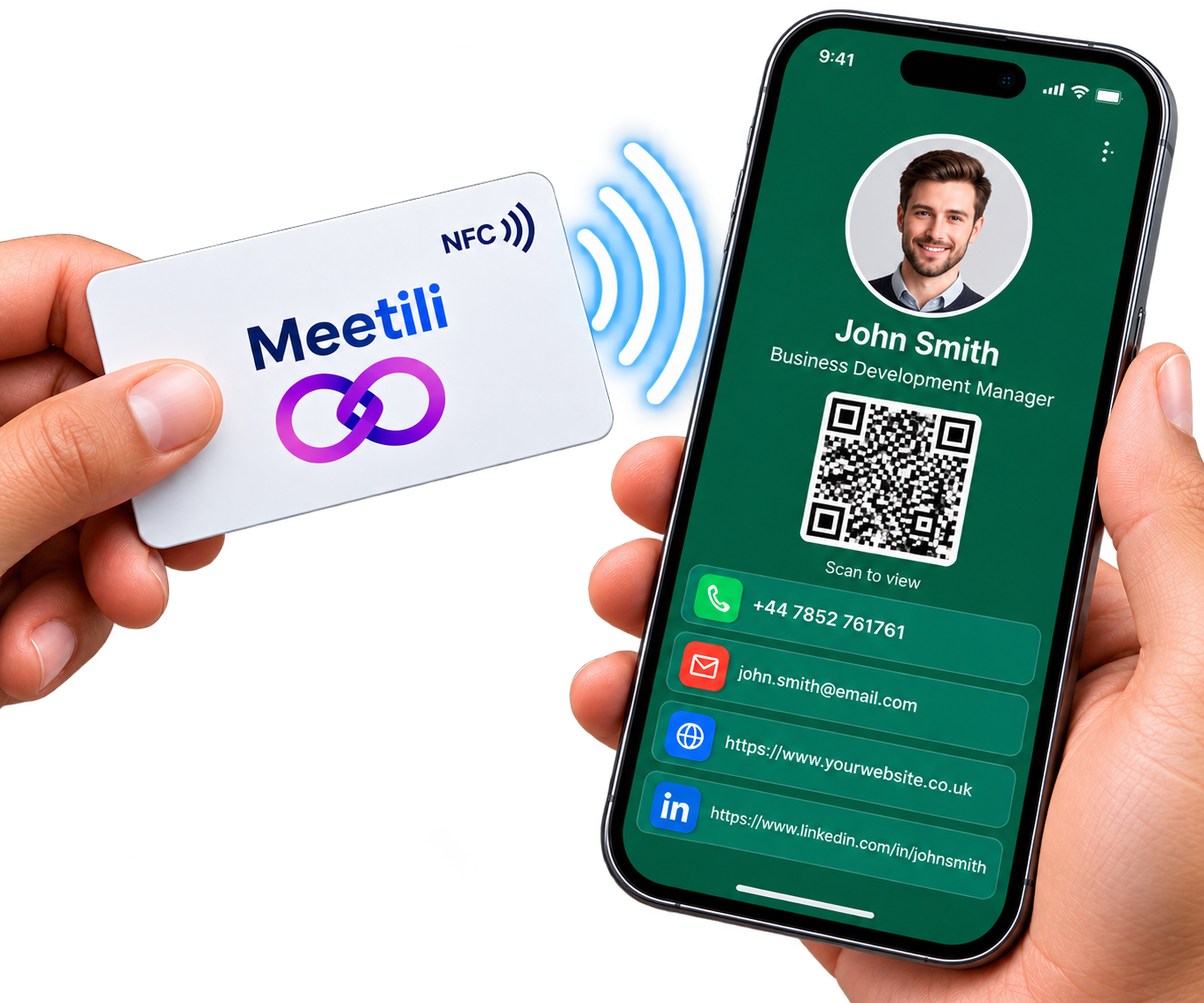
NFC stands for Near Field Communication. It is the technology that lets two devices exchange information when they are placed close together — typically a few centimetres apart. You use it every day for contactless payments and tap-to-pay cards.
With a Meetili NFC digital business card, you write a link to your digital card onto a compatible NFC card or tag. When someone taps that tag against their NFC-enabled phone, your Meetili card opens in their browser. They can view your details and save your contact information without needing an app.
How NFC Sharing Works
Four simple steps from tap to contact saved.
Write your card link to an NFC tag
Use Meetili’s NFC-writing feature to write a permanent link to your digital card onto a compatible NFC card or tag.
Someone taps the tag against their phone
When someone taps your NFC card or tag against their NFC-enabled phone, their phone detects the link.
Your Meetili card opens
Their phone opens your digital card in a browser. They can view your contact details, social links and any other information you have chosen to share.
They save your details
They can save your contact information directly to their phone’s address book with one tap, or get in touch using the links on your card.
QR Code and Link Sharing Included
NFC is one of three sharing methods built into every Meetili card. You do not need to choose just one.
NFC Tap
Tap a compatible NFC tag against a phone to open your card. Requires an NFC-enabled phone on the receiving end.
QR Code
Display your QR code on your phone or print it on materials. A quick scan opens your card on any phone with a camera.
Personal Link
Send your card by text, email or messaging app. Anyone can open it in a browser, on any device.
Update Your Card Without Replacing the Tag
The NFC tag stores a permanent link to your Meetili card — not your contact details. When you update your phone number, email, photo or any other information in Meetili, anyone who taps your NFC tag sees your updated card automatically. You never need to rewrite the tag or buy a new one.
Device Compatibility
NFC sharing works on most modern phones, but there are some requirements to be aware of.
Reading NFC Tags
- Most modern Android phones with NFC enabled can read NFC tags
- iPhone can also read NFC tags — tapping opens the link in Safari
- No app required — the phone’s built-in NFC reader handles it
Writing NFC Tags
- NFC writing requires an Android device with NFC hardware and a compatible browser such as Chrome
- The Meetili Android app supports NFC writing
- iPhone and iPad cannot write NFC tags through Meetili — Apple does not expose Web NFC to the browser
What Meetili Provides
Meetili provides the digital card and the NFC-writing capability. You bring your own compatible NFC tag.
What Meetili provides
- The digital business card with your contact details and social links
- The NFC-writing feature that writes your card link to a compatible tag
- A permanent link that keeps working even if you change your web address
- QR code and personal link sharing as alternatives to NFC
What you provide
- A compatible writable NFC card or tag (such as NTAG213, NTAG215 or NTAG216)
- An Android device with NFC enabled for writing (or the Meetili Android app)
- Your contact details, photo and social links for the digital card
Frequently Asked Questions
Common questions about NFC digital business cards with Meetili.
What is an NFC digital business card?
How does NFC sharing work?
Do I need a special NFC card?
Can I use NFC on iPhone?
Can I update my card after writing it to NFC?
What if someone’s phone does not support NFC?
Does Meetili sell NFC cards?
Start Your NFC Digital Business Card
Create your free digital card, then write it to a compatible NFC tag. Free to create, no credit card required.
Free to create • NFC + QR + Link sharing • Update anytime